
Crawford Group Holdings · Media resources
CGH Ready When — press sheet.
CGH’s free Android organizer is now on Google Play, matching saved tasks to the time, energy and place you choose.
Version 1.0 · Effective November 5, 2026 · Facts reviewed November 5, 2026. Download this package (text). Use your browser’s print command for a print copy.
Dated public facts
Release stage: Version 1.0.0 publicly available; U.S. Google Play listing verified October 27, 2026.
Version: 1.0.0
Platform: Android
Pricing: Free first release; no ads or account.
Announcement first published: 2026-10-27T08:15:31.552001-04:00
Source last substantively updated: 2026-10-27T08:15:31.552001-04:00
Reported milestone: 2026-10-27 — Public availability milestone
Read the source announcement and its updates · Get Ready When on Google Play
Make the moment work for you
A few spare minutes are easier to use when the next action is clear. CGH Ready When helps Android users choose from their own saved tasks using the time, energy and place they select. Version 1.0.0 is now publicly available on Google Play.
The U.S. listing was verified on October 27, 2026, showing CGH Ready When, developer Crawford Group Holdings and an Install option. This public-availability milestone follows the October 25 submission for review. The first release is free, with no subscription or in-app purchase.
Practical choices from your own list
Capture a task with a title, then optionally add an estimated duration, effort, place, needed items, due date or notes. Ready When presents up to three matching actions with explanations, while keeping the full list available for search.
Tasks can wait for an item, a reply, a date or another task. Users confirm when an item arrives or a reply is received. Saved situations and small projects provide ways to organize recurring contexts. Place is selected by the user; the app does not use background location tracking to detect arrival.
Offline records and deliberate backups
Core features work offline without an account, ads, app analytics or automatic cloud synchronization. Optional reminders are approximate and depend on Android notification permissions and device settings.
Manual backup and import use Android’s file picker. A destination chosen by the user may be a cloud provider, and exported backups are not encrypted by the app. Keep a backup before uninstalling or changing devices. Check the official listing for compatibility and regional availability; an Install option does not establish support for every device.
Designated visual and editorial use
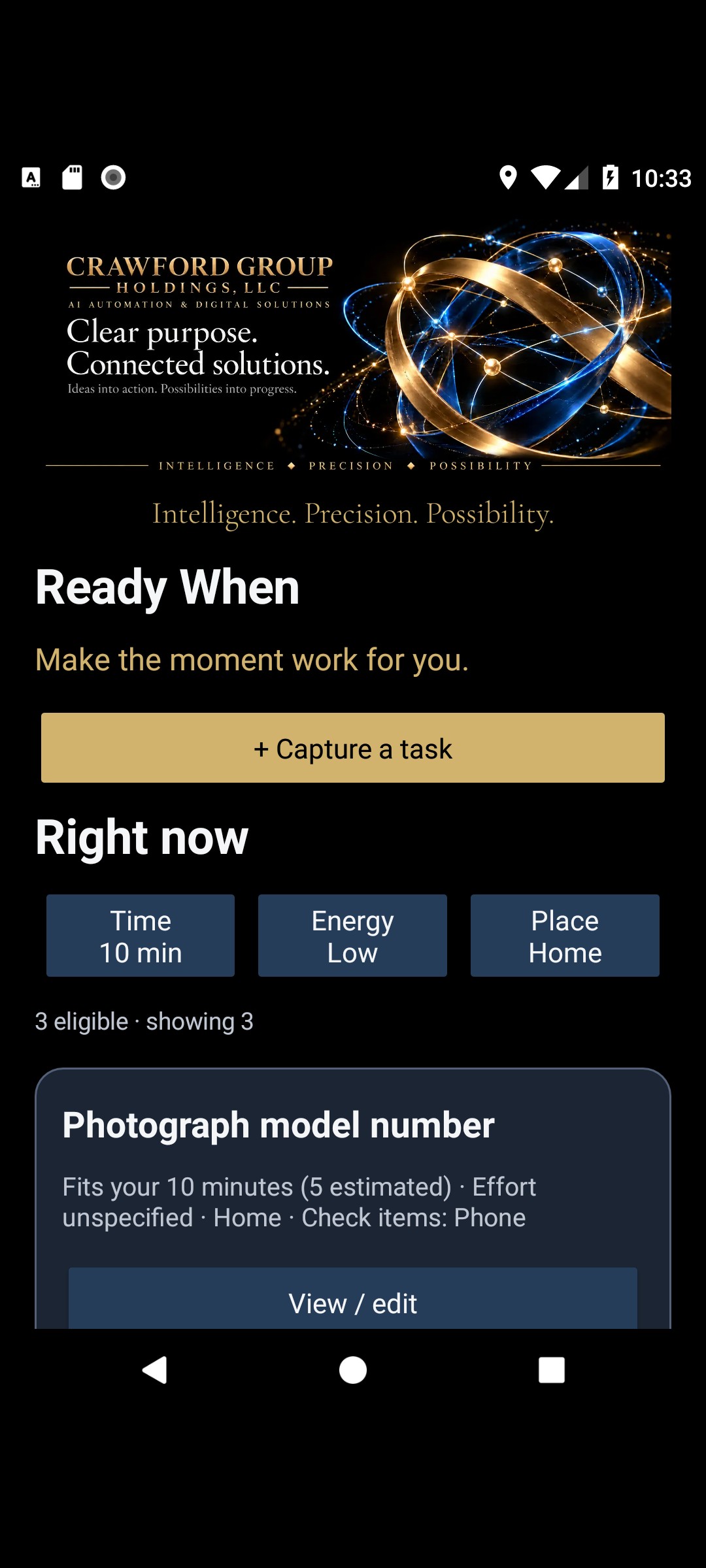
Download existing image. Accessible description: Ready When store screenshot showing time, energy and place controls above a suggested task
Use only in editorial identification under the company-coverage policy. Preserve this caption, credit and stage; an older demonstration image is not proof of the current build. Third-party elements retain their own rights. No source-code, software-distribution or third-party-logo license is granted by this sheet.
Use this sheet accurately
This is a dated compilation of the linked public announcement, reviewed November 5, 2026; it is not a new product release or a fresh test certification. Availability, prices and versions can change. The official product/store destination controls current purchasing and download details. No additional testing, compatibility or endorsement is established here. Ask admin@crawfordgroupholdings.com about unresolved facts before making new claims.